
You've reached the point where Ads Manager, Google Analytics and Shopify all tell you a different story about last month, and you've stopped believing any of them. So you start looking at marketing attribution tools, and within an hour every website you visit promises "the truth about your ad spend" in nearly the same words.
This guide is the comparison we'd want if we were buying. It covers what marketing attribution software actually does, the handful of things that really separate one tool from another, and an honest look at the main options for ecommerce brands. Soran is one of them, and we'll be upfront about where it fits and where it doesn't.
What marketing attribution tools do
Marketing attribution is working out which of your ads and channels deserve credit for each sale. An attribution tool does that job across all your channels at once, instead of letting each ad platform grade its own homework.
Under the hood, every attribution tool does roughly four things:
- Tracks visits and purchases on your store, recording where each visitor came from.
- Connects visits to people and orders, so the ad someone clicked on their phone last week is linked to the order they placed on their laptop today.
- Splits the credit for each order across the touchpoints that led to it, using an attribution model: the rule that decides who gets how much. (A touchpoint is any interaction before the sale, like an ad click or an email visit.) We compare the models in what is multi-touch attribution .
- Brings in your ad spend, so it can calculate ROAS (return on ad spend: credited revenue divided by what you spent) per channel, campaign and ad.
Many tools also send conversions back to the ad platforms so their algorithms learn from better data. That's a separate job from attribution, but it's often bundled in.
What to look for in marketing attribution software
Feature lists all look alike. These are the questions that actually separate tools.
1. Does it capture every purchase?
If the tool only tracks in the browser, it will miss sales. Ad blockers stop tracking scripts, browser privacy features clear cookies, and some shoppers close the tab before the thank-you page loads. A tool that records purchases on the server (your store's systems, not the shopper's browser) doesn't lose them.
Ask: "Are purchases recorded server-side, straight from my store?" Server-side tracking for Shopify explains why this matters.
2. Do the totals add up to my real revenue?
This is the single best test of an attribution tool. Pick a month. Add up the revenue the tool credits to every channel. It should match what your store actually took (for whatever orders it tracked). If it's much higher, the tool is counting some orders more than once, and you're back where you started with the ad platforms.
Ask: "If I add every channel's attributed revenue, does it equal my store's revenue?"
3. Can I see and switch the attribution model?
Different models answer different questions. First touch shows what brings people in. Last touch shows what closes. A good tool lets you switch models on the same data and see the numbers change. Be cautious with a tool that only offers a single proprietary model you can't inspect. It might be good, but you'll have to take its word for it.
Ask: "Which models can I use, and can I explain to my team why an ad got the credit it did?"
4. How deep does it go?
Knowing "Meta works" isn't enough to act on. You need campaign, ad set and individual ad level, with spend matched at each level, so you can tell which creative to scale and which to pause.
Ask: "Can I see ROAS for a single ad, and how is the spend matched to it?"
5. Does it cover the channels I actually use?
Check two separate lists: which platforms it pulls spend from, and which it can send conversions to. Then check your store platform. A tool built for Shopify may not support another platform, and the reverse.
Ask: "Which of my ad accounts can you import spend from today, not on the roadmap?"
6. Does it show profit, or just revenue?
Revenue-based ROAS can make a heavily discounted product look like a winner. If your margins vary a lot by product, look for a tool that steps revenue down through discounts, refunds, cost of goods, shipping and fees, so you can judge campaigns on what you kept.
7. What's the honest setup story?
How long until you see useful data? Every tool needs some time, because attribution can only use journeys tracked after it's installed. Past orders can be imported, but the clicks and visits behind them were never recorded. Be wary of any tool that implies otherwise.
The main options, compared
Here's a fair look at the tools ecommerce brands most often compare. Every tool changes over time, so confirm current features (and pricing) directly with each vendor.
Ad platforms' built-in reporting
Meta Ads Manager, TikTok Ads Manager and Google Ads all report the conversions they think they drove.
- Strengths: free, already set up, and the right place to optimize inside each platform.
- Limits: each platform only sees its own touchpoints and uses its own attribution window (the days after a click or view during which it still takes credit). Add them up and you'll usually get more sales than you actually had.
- Best for: day-to-day optimization within one platform, not cross-channel decisions.
Google Analytics 4
Google's free web analytics tool includes attribution reporting across the traffic sources it sees.
- Strengths: free, widely used, and its default data-driven model adapts to your traffic . It also offers last-click models, including one limited to Google's paid channels.
- Limits: its standard setup tracks in the browser, so it's exposed to ad blockers and consent choices. It's built for web analytics in general rather than ad spend decisions for a store, and the reasoning behind data-driven credit isn't visible.
- Best for: a free baseline view of traffic and conversions.
Triple Whale
An analytics and attribution platform built around Shopify brands.
- Strengths: its own tracking pixel (Triple Pixel) , dashboards that pull store and ad data together, creative analytics, and an AI assistant called Moby. It has also expanded into broader measurement, including marketing mix modeling and incrementality features.
- Limits: it's a broad platform, so there's a lot to configure and learn, and much of its value depends on the pixel and server-side connections being set up correctly.
- Best for: Shopify brands that want an all-in-one analytics workspace with dashboards at the center.
Northbeam
A measurement platform focused on brands with significant ad spend across many channels.
- Strengths: several attribution approaches you can toggle between , including a clicks-only model and models that factor in ad views (one based on machine learning, one on deterministic view data). It also offers a marketing mix modeling product called MMM+ for budget planning.
- Limits: its modeled-view approach relies on machine learning you can't fully inspect, and the mix modeling product needs several months of historical data plus a calibration stage before it's useful.
- Best for: larger brands with multi-channel budgets, including channels where views matter as much as clicks.
Hyros
An ad tracking and attribution tool that's popular with businesses that sell over the phone or through longer funnels.
- Strengths: its own identity method it calls "print tracking" , call tracking that connects phone calls and closed sales back to ads, and sending verified conversions back to ad platforms.
- Limits: its strongest features (calls, applications, offline closes) are aimed at lead and sales-call businesses, so a typical store selling straight through checkout may not use much of it.
- Best for: high-ticket offers, coaching, info products and call-based sales, more than classic online retail.
Soran
Attribution and profit analytics for ecommerce brands and the agencies that run them.
- Strengths: purchases recorded server-side, credit split once per order so totals add up, ten attribution models you can switch between, spend matched to the exact ad, and profit reporting down to contribution margin.
- Limits: Shopify is the only store platform today. Ad spend imports from Meta and TikTok. Google Ads support is coming soon, so Google spend isn't included yet.
- Best for: Shopify brands spending on Meta and TikTok who want honest ROAS and profit per campaign and product, and agencies running many stores.
How to compare attribution tools in a trial
A demo shows you the best case. A trial on your own store shows you the truth. Here's how to run one:
- Install early. The tool can only attribute journeys it tracked, so the sooner it's running, the sooner you have something to judge.
- Wait for real volume. Give it at least a couple of weeks of normal traffic before drawing conclusions.
- Run the totals test. Compare total attributed revenue with your store's revenue for the same days.
- Check a few orders by hand. Pick five recent orders and look at the journey the tool shows for each. Does it match what you know (the campaign you ran, the email you sent)?
- Compare two models. Look at first touch and last touch side by side. Does the tool make it easy, and do the differences make sense?
- Look for gaps. Any channel with revenue but no spend usually means an ad account isn't connected. Any channel with spend but no revenue might be a tracking problem.
- Make one decision with it. The real test of an attribution tool is whether it changes what you do with your budget, and whether that change works.
Common mistakes when choosing a tool
- Buying on the dashboard. Pretty charts are easy. Accurate data is hard. Run the totals test before you care about the design.
- Expecting it to match Ads Manager. It shouldn't. Each platform counts by its own rules and claims any sale it touched. A tool that matches them exactly isn't telling you anything new.
- Ignoring connected spend. ROAS is only as complete as the ad accounts you connect. A missing account makes a channel look free.
- Expecting attribution to prove cause. Attribution shows which touchpoints were present before a sale. Proving an ad created extra sales takes a holdout test, where some people deliberately don't see the ad.
- Switching tools every quarter. Each switch resets your history. Pick carefully, then give it time.
How Soran handles it
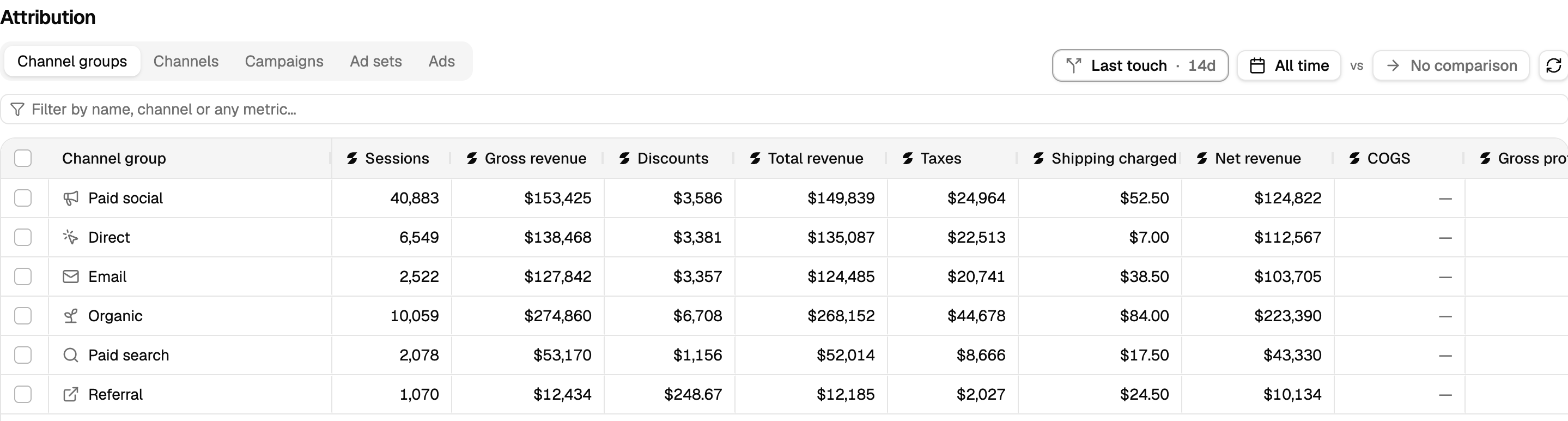
Revenue by channel group in Soran's attribution report, on a demo store.
Soran records every Shopify order on the server, so ad blockers, tracking prevention and closed tabs don't lose sales, and setup shows you how many events arrived in the last 24 hours so you know it's working. Each order's credit is split once across the visits that led to it, and you can switch between ten attribution models with every number updating.
Spend from Meta and TikTok is matched to the exact ad behind each order. If a channel shows revenue but no spend, Soran flags it as a probable unconnected ad account rather than showing a flattering ROAS. Revenue steps down to contribution margin, so you can see profit per campaign and per product, and conversions can be sent back to Meta, TikTok and other destinations with duplicates removed. It's one flat price with every feature included, and agencies can run each store as its own property in one organization.
Frequently asked questions
What is the best marketing attribution tool?
It depends on your store. Look at which store platform you use, which ad accounts you spend on, and whether you care about profit or just revenue. The best tool is the one that captures every purchase, adds up to your real revenue, and covers the channels you actually spend on.
Is Google Analytics 4 good enough for attribution?
It's a useful free baseline. Its limits for ecommerce ad decisions are that its standard setup tracks in the browser, so some purchases are missed, and its data-driven model doesn't explain its reasoning. Many stores use GA4 for general traffic analysis and a dedicated tool for ad spend decisions.
How long does it take an attribution tool to show useful data?
Usually a few weeks of normal traffic. Tools can import past orders, but they can't recover the ad clicks and visits behind them, because those were never tracked. The clock starts the day tracking is installed.
Why doesn't my attribution tool match Meta Ads Manager?
Meta only sees its own ads and uses its own attribution window, so it often claims sales that other channels also touched. A cross-channel tool gives each order's credit once. The two numbers measure different things and won't match.
Do I need an attribution tool if I only advertise on one platform?
Less urgently. With one ad channel, the main gaps are lost purchases and the influence of free channels like email and organic search. Once you spend on two or more platforms, overlapping claims make a dedicated tool much more valuable.
Want to run the totals test on your own store? Book a demo and we'll set it up with you.